Connect your GivEnergy system to Wattlas
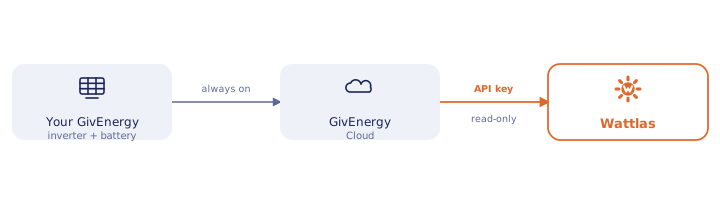
What you'll need
Connecting this account requires Wattlas Plus.
- An active GivEnergy Cloud account for your own system
- Your inverter serial (on the inverter's sticker, or in the portal) and an API key
- About 2 minutes - treat the key as a one-time reveal, same as everywhere else here
Connect it in Wattlas
-
Get your API key from GivEnergy Cloud
Log into GivEnergy Cloud → Account Details → API Key. Your inverter serial is on the sticker on the inverter itself, or in the same portal under your system's details. Copy the key somewhere safe as soon as it's generated - if you'll want it for other services too, save it now rather than hunting for it again later.
-
Open Setup → Inverter in Wattlas
Tap the gear icon top-left of the app, then the plug icon for the Inverter tab, and pick
GivEnergy (Cloud)from the dropdown. -
Enter your inverter serial and API key
This is the exact form you'll see:
Connect GivEnergy (Cloud)
How to find these: log into GivEnergy Cloud → Account Details → API Key. Your inverter serial is on the sticker on the inverter itself, or in the same portal under your system's details. Requires an active GivEnergy Cloud subscription (separate from this app - GivEnergy moved this behind their own paywall in 2026).Inverter serial
GivEnergy Cloude.g. AB1234G567API key••••••••••••Test connection Save -
Test, then save
Tap Test connection - once it reports a real kWh reading back, Save unlocks. A typo here fails loudly rather than silently saving a broken connection.
Common questions
Do I need a GivEnergy Cloud subscription to connect?
Yes - Wattlas reads through your own GivEnergy Cloud account, the same way any third-party app reads any API, so it needs whatever access that account has. See our GivEnergy owners page for what changed there in 2026.
Can I connect without GivEnergy Cloud, using local GivTCP instead?
There's an advanced "GivEnergy (local GivTCP)" option in the same dropdown, for households who already self-host GivTCP and an MQTT broker on their own network. It's not a plug-and-play alternative to a subscription - if that doesn't mean anything to you, use GivEnergy Cloud instead.
Can Wattlas control my GivEnergy inverter or battery?
No. Wattlas only ever reads from GivEnergy Cloud (or your local GivTCP bridge) - it can't change inverter or battery settings. That stays in GivEnergy's own app.
Other integrations
Start monitoring your home energy.
Solar, battery, car charging and energy tariff costs, all in Wattlas.