What you'll need
Connecting this account requires Wattlas Plus.
- An EDF Energy electricity account - the one you sign in to at my.edfenergy.com
-
The email and password you use for
my.edfenergy.com, and your account number (e.g.
A-1234ABCD, shown on your bills) - About 2 minutes
Connect it in Wattlas
-
Open Setup → Tariff in Wattlas
Tap the gear icon top-left of the app, then the receipt icon for the Tariff tab. Choose I'm on EDF Energy from the list and tap Connect account.
Setting up for the first time? The setup wizard asks “How are you charged for energy?” - pick I'm on EDF Energy there and the same form appears.
-
Sign in with your EDF login
This is the form you'll see:
Connect your EDF account
Auto-detects your current tariff, using EDF's public rate data - on top of whatever inverter you've connected above.Emailyou@example.comPasswordPasswordThe same login you use for my.edfenergy.com - used once to get an API key, never stored. This issues a fresh key, so any key you've used elsewhere (another app, EDF support) will stop working. I already have an API keyAccount numbere.g. A-1234ABCDConnect account -
That's it
Wattlas finds your current tariff and fills in your standing charge. After that, Setup shows your EDF API key, hidden until you tap Show, in case you want to use it in another app too.
What about Power Perks?
EDF sends Power Perks times by text the day before and doesn't share them with other apps, so Wattlas can't pick them up by itself.
When you get one, open the Provider tab and tap Add a free session. Wattlas prices your import at £0 for that window and reminds you at 9am on the day and again 5 minutes before it starts.
Common questions
Why does Wattlas ask for my EDF password?
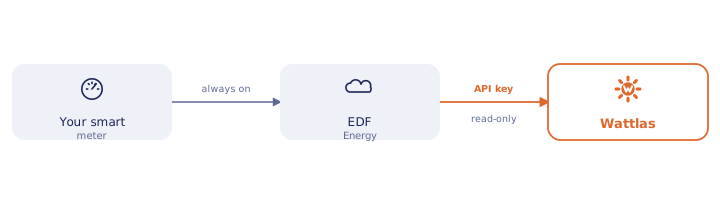
EDF has no page where you can create an API key yourself. Wattlas uses your login once to create one for you, then forgets the password - only the key is stored. If EDF support has already given you a key, tap "I already have an API key" and use that instead.
Will connecting stop another app that uses my EDF key?
It can. Signing in creates a fresh key, and EDF only allows one, so any key you've used elsewhere stops working. Once you're connected, Setup shows your new key (hidden until you tap Show) so you can paste it into the other app. EDF's own website doesn't show it anywhere.
Does Wattlas find my Power Perks sessions automatically?
No. EDF texts the times and doesn't share them with other apps. Add each one in the Provider tab and Wattlas does the rest.
Can Wattlas switch my tariff or change anything on my EDF account?
No. Wattlas only ever reads from your EDF account - it can't switch tariffs, make payments, or change any setting. Disconnecting deletes the stored API key and everything cached alongside it.
Other integrations
Start monitoring your home energy.
Solar, battery, car charging and energy tariff costs, all in Wattlas.