What are Saving Sessions?
Saving Sessions is how Octopus pays its customers to change when they use electricity. There are two kinds. A Power Down asks you to use less than usual for an hour or so, normally when demand on the grid is high. A Power Up is the reverse: there's more green power about than the grid can use, so you're paid to use more. You earn Octopoints for each kilowatt-hour you shift, and you can turn those into account credit and other rewards.
Many sessions start with the grid operator, NESO. Its Demand Flexibility Service pays energy companies to get their customers to cut or add demand at particular times, and Octopus is one of the companies signed up. Octopus picks which of those requests to pass on to its customers, so you won't see a session every time the grid asks.
Who can take part?
You'll need to have joined Octoplus, the free rewards programme you sign up to from your Octopus account. You'll also need to pay by Direct Debit or be on smart prepay, and have an electricity smart meter that sends half-hourly readings. Octopus uses those readings to work out your normal use and what you actually did during a session, so it wants about two weeks of them, with few gaps, before you can join in.
Solar and battery homes can take part too. Octopus looks at your export as well as your import, and judges a Power Down on the overall change.
How is your normal use worked out?
Each session is measured against a baseline taken from your own recent readings. For a weekday session, that's the same half-hours across your last ten weekdays, leaving out days that had sessions. At weekends and on bank holidays, it's your last four weekend days. Use less than that in a Power Down, or more in a Power Up, and you earn points. If you just carry on as normal, nothing happens: you don't lose anything, you just don't earn.
How often do sessions happen?
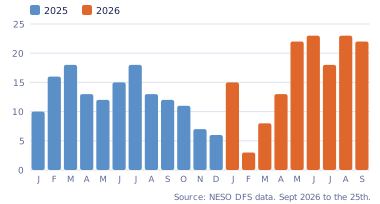
Octopus doesn't commit to a number, because it depends on how much help the grid needs. NESO publishes every request it makes, though, and that's what the chart below shows. Through 2025 the grid asked for help on between 6 and 18 days a month. It's been much busier since the new scheme year began in April 2026: 18 to 23 days a month from May, and 22 days in September up to the 25th. Most of these are Power Down requests. Power Up requests have dropped away as the summer ended.
Sessions are short, usually an hour or two, and Power Downs mostly fall in the early evening. You don't get much warning. Octopus says it normally gives two to six hours' notice for a Power Down, and sometimes only two for a Power Up. The invitation comes by email and shows up on your Octoplus dashboard.
What are Weekend Happy Hours?
For now there's an extra reward. If you use less in two Power Downs in a week, you earn an hour of free electricity at the weekend. Slots for the coming weekend open on Thursday, mostly on Sunday daytimes, and you book one from your dashboard, as late as five minutes before it starts. Octopus then credits back whatever you import during that hour, up to 16kWh. You can hold two free hours at a time, and the popular slots do fill up.
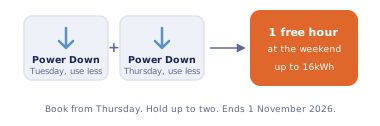
Happy Hours finish on 1 November 2026, and any you haven't used by then are lost, so use the ones you've earned rather than saving them.
How do you make the most of it?
You don't have to sit in the dark. Most of what you'd save in a Power Down comes from moving things, like running the dishwasher or washing machine before the session instead of during it. If you have a home battery with some charge in it, it can often cover the whole hour for you. Power Ups are the time for the heavy stuff: charging the car, topping up the battery or heating the hot water. A free hour works the same way, and 16kWh is enough to charge a car and a battery together.
Do you have to opt in every time?
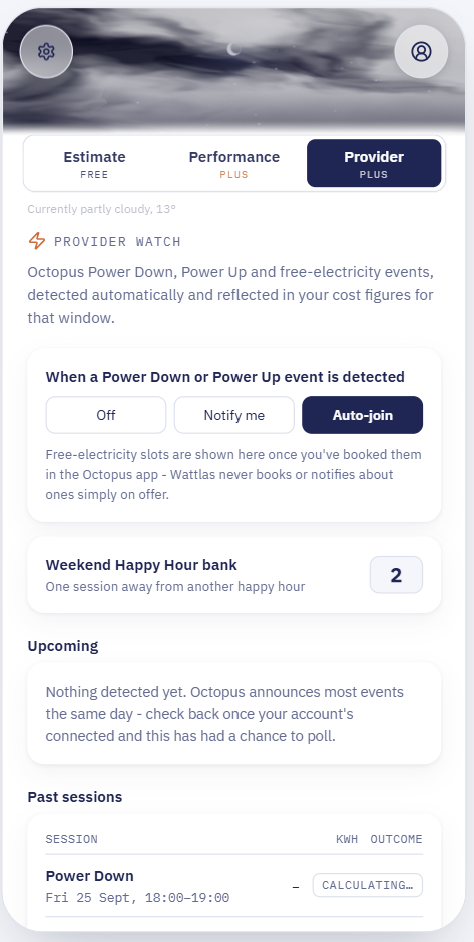
The part people tend to grumble about is that you have to opt in to every session separately, before it starts. There's no setting to join them all. With only a few hours' notice and sessions coming several times a week, it's easy to miss the email while you're at work or out, and lose both the points and the Happy Hour those two sessions would have earned.
Some third-party apps can do this for you. Wattlas has an Auto-join option: once your Octopus account is connected, it joins each Power Down and Power Up as soon as it spots one, checks that Octopus has confirmed you're in, and lets you know. It also reminds you on the morning of a booked Happy Hour and again five minutes before it starts. If you'd rather decide for yourself, you can set it to just notify you instead.
Sources
Octopus Energy - Saving Sessions
Octopus Energy - Saving Sessions FAQs
Octopus Energy - Weekend Happy Hours
Octopus Energy - Octoplus
NESO Data Portal - Demand Flexibility Service (request data,
2025/26 and 2026/27; the chart counts days with at least one live
request)
The Octopus Energy logo is a trademark of its owner and is shown
only to identify the company. Wattlas isn't affiliated with Octopus
Energy.
Start monitoring your home energy.
Solar, battery, car charging and energy tariff costs, all in Wattlas.